

Impact points
Damage FX Script Component
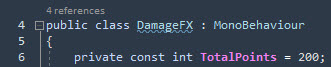
Section titled “Damage FX Script Component”Modify the constant value of the Damage FX Script Component:
Assets/FORGE3D/DamageFX/Scripts/DamageFX.cs
Amplify Creations Shader Editor Users
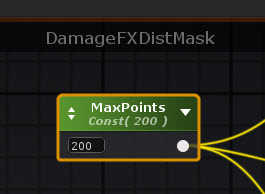
Section titled “Amplify Creations Shader Editor Users”Open the DamageFXDistMask function from the Assets/FORGE3D/DamageFX/Shaders/ and change the number of MaxPoints constant matching the number set in the script component. Recompile both Damage FX Functions and all shaders affected by this change.
Modifying shaders by hand
Section titled “Modifying shaders by hand”Open the Damage FX Shader sample and search for the existing number of points in the search field of your favorite editor:


